Landing Page Design Checklist: 9 Elements That Convert
By Harsh Rai
A landing page design checklist: the nine elements of a high-converting page, what to test first, mobile and consent checks, and common mistakes.
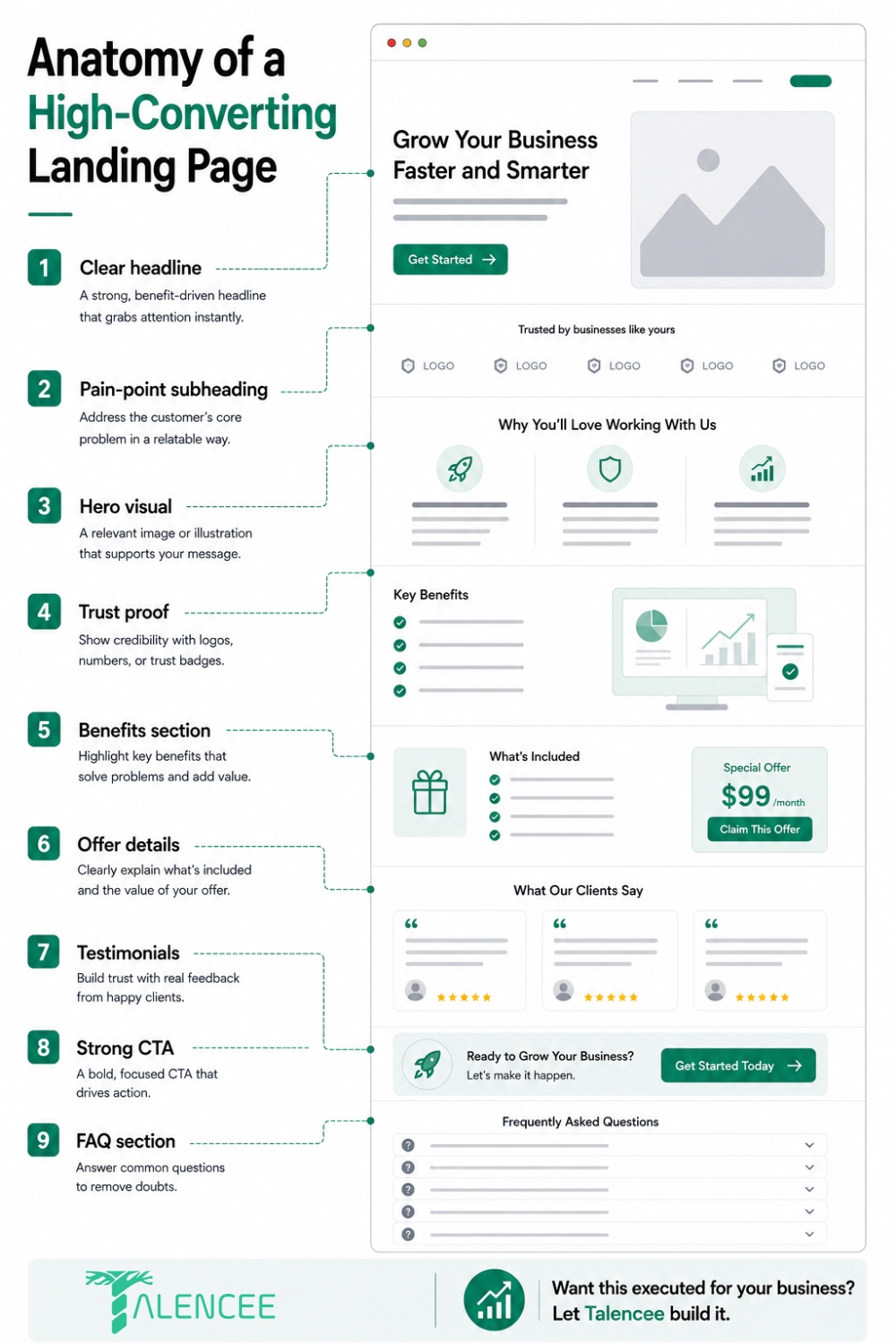
A landing page design checklist for a page that actually converts has nine parts: a clear headline, a pain-point subheading, a hero visual, trust proof, a benefits section, offer details, testimonials, a strong call to action and an FAQ section. Skipping or weakening any one of them does not just make the page look incomplete. It gives a visitor a reason to leave before taking the action the page exists for.
Benchmarks show how much the build matters. Unbounce's Q4 2024 dataset, which covers about 41,000 landing pages and 57 million conversions, reports a median conversion rate of 6.6% across industries, while the best pages convert at around 11% or more. The gap between those numbers is not explained by traffic quality alone. Much of it comes from how clearly the page is built. This landing page design checklist walks through each element, what good looks like, what to test first and how to measure the result.
Quick note: We are Talencee, and we design and build landing pages, so we have a stake in this topic. The checklist works whether you build the page yourself or hire help. Benchmarks vary by study and definition, and the sections on claims and data are general information, not legal advice.
What Is a Landing Page, and When Do You Need One?
A landing page is a standalone page built for one goal, such as booking a call, requesting a quote, downloading a guide or buying one product. A homepage is built for browsing. A landing page is built for one decision.
You need a dedicated landing page whenever you send traffic from a specific source with a specific message, for example:
• Paid ads on Google or social media
• Email campaigns and newsletters
• A launch, an event or a seasonal offer
• A service you want to generate leads for
A landing page design checklist is most useful when you have a specific campaign or offer to build for. Sending paid traffic to a homepage is one of the most common ways to waste an advertising budget. The visitor clicked because of one promise, and the homepage talks about everything.
What Conversion Rate Should You Expect?
Benchmarks help you judge whether a page built from this landing page design checklist is in a sensible range, but they vary a lot by industry, traffic source and what counts as a conversion. These figures come from Unbounce's Q4 2024 benchmark data, as reported in public summaries.
Measure | Reported figure |
Median conversion rate, all industries | About 6.6% |
Top-performing pages | About 11% or more |
Financial services median | About 8.4% |
SaaS median | About 3.8% |
Email traffic | About 19.3% |
Paid social traffic | About 12% |
Paid search traffic | About 10.9% |
Display ads | About 4.1% |
You can see these figures in summaries from Sender and ClickMinded. ClickMinded also notes that Unbounce's 6.6% is a median, not an average, and that a benchmark only makes sense once you define the action you want, because a newsletter signup, a demo request and a purchase convert at very different rates.
Use these numbers as planning ranges. The most useful benchmark is your own page's trend over time.
The 9 Parts of a High-Converting Landing Page
Each part of the landing page design checklist below includes what it does, what good looks like and the mistake to avoid.
1. Clear Headline
The headline is the first thing a visitor reads, and often the only thing. It needs to state the offer or outcome in plain language within the first few words, before a visitor has to scroll or think about what the page is for.
What good looks like:
• It names the outcome, not the company.
• It uses the visitor's words, not internal jargon.
• It matches the ad, email or link that brought them there.
• It fits on two lines on a phone.
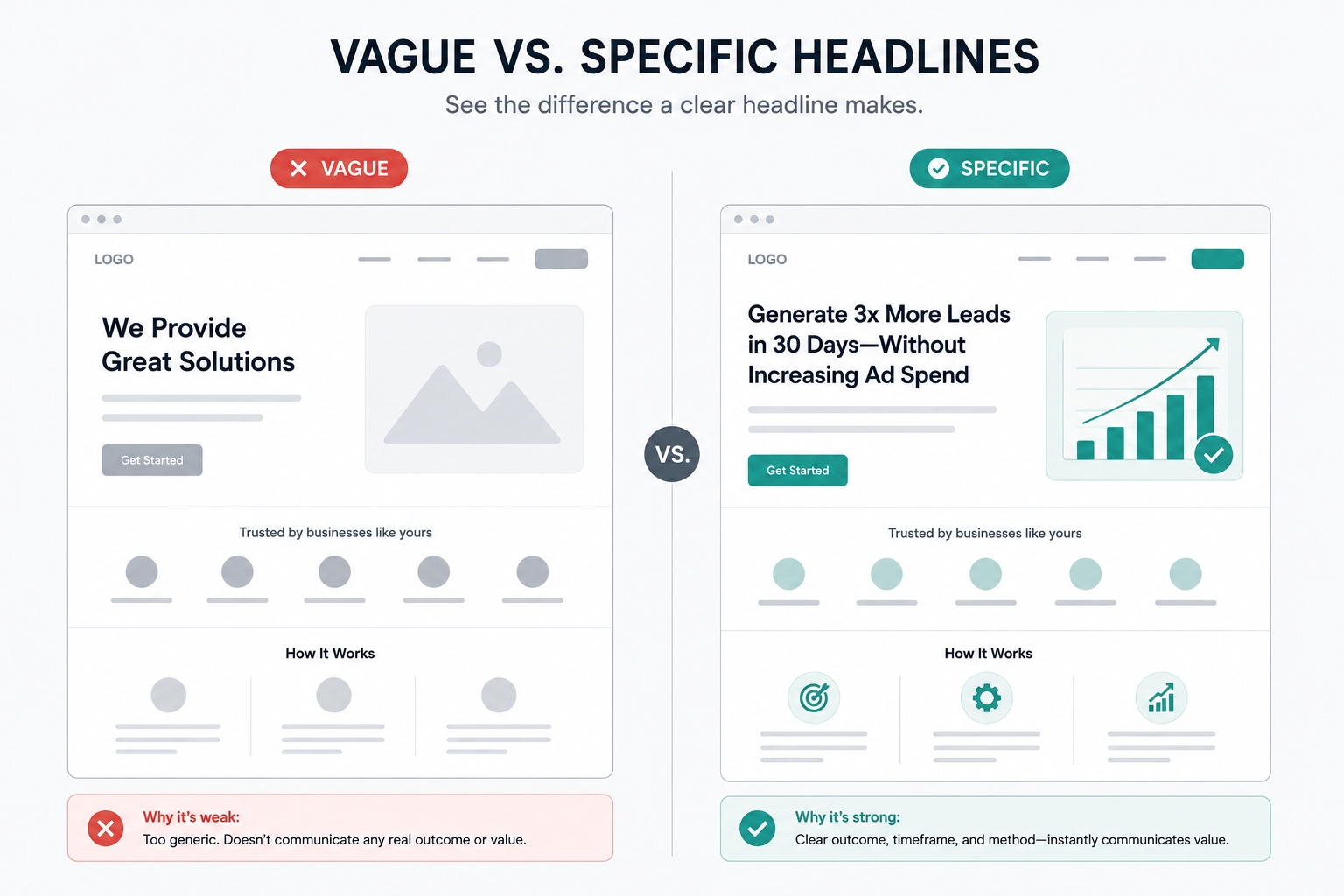
Vague: "Smart solutions for modern businesses."
Specific: "Get 20 qualified leads a month from Google Ads, or we fix the campaign free." (Only write a promise like this if you can honour it.)
Common mistake: writing the headline last, as an afterthought, when it is one of the most important lines on the page.
2. Pain-Point Subheading
If the headline states the outcome, the subheading earns the click by naming the specific problem that outcome solves. This is where generic corporate language does the most damage. A subheading that could belong to any competitor's page is not doing its job.
What good looks like:
• It names one specific frustration, such as "Tired of leads that never answer the phone?"
• It speaks to the visitor's hesitation, not your features.
• It stays to one or two lines.
Common mistake: repeating the headline in different words instead of naming the problem.
3. Hero Visual
The hero visual does more than decorate. People process images quickly, so it sets the tone before they read any copy. A product shot, a short demo video or a real photo of the outcome usually works better than generic stock imagery.
What good looks like:
• It shows the product, the result or the real team.
• It supports the headline instead of competing with it.
• It is compressed and loads fast, especially on mobile.
• It has clear alt text.
Common mistake: using a large decorative photo that pushes the call to action below the first screen.
4. Trust Proof
Logos, certifications, security badges or a simple stated number, such as customers served or years in business, reduce the hesitation a new visitor feels before they have a reason to trust you. This works best close to the top of the page, not buried at the bottom where a sceptical visitor has already left.
What good looks like:
• Real client logos you have permission to show
• Review ratings from a named platform, with the number of reviews
• Certifications, awards or memberships that are verifiable
• Payment and security badges, if you take payments
• For Indian businesses, details such as registered company name, address and a working phone number
Common mistake: using trust badges that mean nothing to the visitor, or invented numbers.
5. Benefits Section
Benefits turn features into outcomes a visitor cares about. This section should answer what each feature changes for the visitor, not just list what the product or service includes.
What good looks like:
• Three to five focused benefits, not a long list
• A short heading for each, followed by one or two lines
• A feature-to-benefit pair, such as "Weekly reports (so you always know what your budget is doing)"
• Icons or small visuals that aid scanning
Common mistake: listing features in the company's language and forcing the visitor to work out why they matter.
6. Offer Details
Clarity matters more than persuasion here. What exactly is being offered, what does it cost, and what happens immediately after someone converts? Pages with one clear offer tend to convert better than pages that split attention across several. Unbounce data reported by Marketing LTB says that pages with a single call to action converted at about 13.5%, compared with about 10.5% for pages with five or more links.
What good looks like:
• A plain description of what the visitor gets
• Price or price guidance, where you can share it
• A short "what happens next" list, such as "We call you within one working day"
• Any terms, guarantees or limits stated honestly
Common mistake: presenting three offers on the same page and hoping one sticks.
7. Testimonials
Testimonials work best when they are specific. A named result or detail beats a vague compliment nearly every time. "Cut our cost per lead from one figure to a lower one in 90 days" does more than "great service, highly recommend."
What good looks like:
• A real name, role and company, with permission
• A specific result or detail
• A photo or logo where possible
• Placement near the objection it answers, such as price, complexity or trust
Common mistake: inventing or editing testimonials. Use only genuine ones. See the section on honest claims below.
8. Strong CTA
The call to action is the most tested element on most landing pages. Sources disagree on exact numbers, and tests vary, so rely on principles instead of percentages:
• Make it visible without hunting, on a phone as well as a desktop.
• On a short page, one CTA near the top may be enough. On a longer page, repeat the same CTA at natural decision points.
• Write it around the specific offer, such as "Get my free audit", instead of a generic "Submit" or "Learn more".
• Make the button large enough to tap, with strong contrast.
• Keep one primary action. Secondary links add choices that dilute attention.
Common mistake: using several different CTAs that pull the visitor in different directions.
9. FAQ Section
An FAQ section catches the objections a visitor did not voice but still has. It is often the last thing standing between interest and conversion, especially for higher-consideration offers.
What good looks like:
• Five to eight real questions from sales calls and emails
• Short, honest answers
• Questions about price, timing, risk and what happens next
• A final CTA beneath the FAQ
Common mistake: filling the FAQ with marketing slogans instead of real answers.
The Landing Page Design Checklist at a Glance
Element | Key question | Quick test |
Headline | Does it state the outcome in plain words? | Read it alone. Is the offer clear in five seconds? |
Subheading | Does it name a specific problem? | Could a competitor use the same line? |
Hero visual | Does it show the product or result? | Does the CTA still appear on the first screen of a phone? |
Trust proof | Is it real and near the top? | Can each claim be verified? |
Benefits | Do they explain what changes for the visitor? | Does each have an outcome, not just a feature? |
Offer details | Are the offer, price and next step clear? | Can a visitor say what happens after they submit? |
Testimonials | Are they specific and genuine? | Do they include a name and a result? |
CTA | Is there one clear action? | Is the button text specific to the offer? |
FAQ | Does it answer real objections? | Are the questions from real customers? |
The Four Elements Worth Testing First
Working through a landing page design checklist is only half the job. With nine parts to a landing page, testing everything at once produces noise, not answers. Testing guides most often start with the same four elements: the headline, the hero visual, the primary call to action and the form. A recent roundup from Sender also notes that headlines, CTA buttons and images remain the most commonly tested elements.
How to test sensibly:
1. Change one element at a time. Otherwise you cannot tell what caused a change.
2. Wait for enough traffic. A page with a handful of visits a day takes weeks to show a reliable result.
3. Run tests for full weeks, so weekday and weekend behaviour are both included.
4. Decide the success measure first, such as form submissions, not clicks.
5. Record every test, with the date, the change and the result.
6. Fix big problems before small ones. Button colour tests rarely matter if the headline is unclear.
If your page gets little traffic, skip formal split tests. Make the best changes you can, then compare the page's results over several weeks.

Mobile, Speed and Accessibility
Every landing page design checklist should start with the phone, because most landing page traffic from ads and social media arrives on phones.
Mobile checklist:
• The headline, hero and CTA all appear on the first screen
• Buttons are large enough to tap with a thumb
• Text is readable without zooming
• Forms use the right keyboards, such as a number pad for phone fields
• A tap-to-call or WhatsApp button is available where it suits your customers
Speed checklist:
• Compress images and use modern formats
• Remove scripts and widgets you do not need
• Test with PageSpeed Insights and check Core Web Vitals
• Keep the page light, because slow pages lose visitors before they see the offer
Accessibility checklist, based on the Web Content Accessibility Guidelines:
• Text contrasts strongly with its background
• Images have descriptive alt text
• Form fields have visible labels
• The page works with a keyboard
• Links and buttons describe where they go
Accessible pages are easier for everyone to use, and that tends to help conversion.
Forms: Fewer Fields and Clear Consent
Forms belong on any landing page design checklist. The form is where interest turns into a lead, and it is often where visitors drop out.
• Ask only what you need. Every extra field costs completions. A name, a phone number or email and one qualifying question is often enough.
• Use clear labels and helpful error messages.
• Explain the next step next to the button, such as "We reply within one working day."
• Show a thank-you page that confirms what happens next, and track it as your conversion.
• Follow up quickly. A fast reply can matter as much as the page itself.
In India, forms collect personal data. The Digital Personal Data Protection Act, 2023 may apply. The government notified the DPDP Rules in November 2025, with a phased rollout, and you can read the official summary in this Press Information Bureau document. In practice, tell visitors what you collect and why, link to a privacy policy and ask for consent where required. If you plan to call or message people, follow the telecom regulator's rules on calls and texts. Take legal advice for your situation.
Copy That Converts
Clear writing belongs on every landing page design checklist, because it helps conversion. Unbounce's Q4 2024 data, as reported by SHNO, found that pages written at roughly a fifth to seventh grade reading level converted at about 11.1%, compared with about 5.3% for college-level copy. Treat this as a direction, not a guarantee.
Writing tips:
• Use short sentences and everyday words.
• Lead with the benefit, then the detail.
• Address the visitor as "you".
• Cut filler such as "innovative", "best-in-class" and "solutions".
• Read the page aloud. If you stumble, rewrite it.
Landing Page Layouts by Offer Type
Different offers need different emphasis, so apply the landing page design checklist differently for each offer type.
Offer type | Focus on | Form length | Strongest trust proof |
Service lead generation | Outcome, process and a free consultation | Short | Reviews, case results, years in business |
Software demo | Problem solved and a quick preview | Short to medium | Customer logos, security details |
E-commerce product | Images, price, delivery and returns | Checkout flow | Ratings, return policy, secure payment |
Webinar or event | Date, speakers and what attendees learn | Short | Past attendee feedback |
Downloadable guide | What is inside and who it is for | Very short | Author credentials |
Honest Claims and Testimonials in India
Add honesty to your landing page design checklist: strong pages need strong claims, but claims must be true. This is general information, not legal advice.
• Use only genuine testimonials, with the customer's permission.
• Do not invent results, numbers or awards.
• Show where a statistic comes from, and keep it current.
• Do not promise outcomes you cannot control. "Results vary" notes are fine when they are true.
• India's advertising rules, including the standards of the Advertising Standards Council of India at ascionline.in, and consumer protection law expect advertising to be truthful and endorsements to be genuine.
False or exaggerated claims damage trust and can attract complaints.
A Reality Check on Benchmarks
Reported landing page conversion benchmarks vary quite a bit depending on the study and how "conversion" is defined. A lead form fill, a demo booking and a newsletter signup are very different asks, with very different natural conversion rates. Some summaries quote a median, some an average and some a top-10% figure, so the same dataset can produce different headline numbers.
Treat any single benchmark as a planning range, not a target to hit exactly. Pay closer attention to your own page's trend over time than to how it compares with an industry-wide average from a different context.
How to Measure and Improve a Landing Page
Measuring results is the last step of a landing page design checklist. Track these numbers for every page:
• Conversion rate, by traffic source
• Form completion rate, meaning submissions divided by people who started the form
• Cost per lead, if you run paid traffic
• Lead quality, from your sales team's feedback
• Page speed and mobile performance
• Scroll depth and clicks, using heatmaps or session recordings
A simple improvement routine:
1. Set a baseline for four weeks.
2. Fix the biggest obvious problems: unclear headline, slow load, long form.
3. Test one element at a time.
4. Review results monthly and keep a log.
5. Revisit the whole page at least once a quarter, or sooner if the offer changes.
For deeper conversion work, read our guide to fixing hidden funnel leaks, or see our conversion rate optimization service.
Common Mistakes That Quietly Cap Conversion
These are the mistakes a landing page design checklist is meant to catch.
• Sending paid traffic to the homepage instead of a dedicated page built around that specific offer or campaign message.
• Presenting more than one offer or call to action, which splits attention.
• Writing the headline last, when it is one of the most important lines on the page.
• Testing minor details first, such as button colours, before the headline, hero, CTA and form are solid.
• Leaving site navigation on the page, which gives visitors ways to leave.
• Ignoring mobile, where most paid traffic arrives.
• Using slow, heavy images and videos.
• Hiding the form or CTA below long blocks of text.
• Using fake urgency, such as countdown timers that reset.
DIY or Get Help With Your Landing Page?
You can work through this landing page design checklist yourself. Use this table to decide where help makes sense.
Task | Safe to do yourself? | When to get help |
Writing headline and copy | Yes, with the checklist above | When results stay flat after a few edits |
Choosing images | Yes, with real photos | For product shots and custom visuals |
Building the page | With a good page builder | For custom design, speed and tracking |
Setting up tracking and forms | Basic setup, yes | For CRM links and call tracking |
Split testing | For high-traffic pages | For regular programmes across many pages |
Redesigns for many campaigns | Not recommended | When you run many campaigns or markets |
If you want a page designed, built and tested properly from the start, see our landing page development service, or our web UI/UX design work for wider design projects.
Frequently Asked Questions
What is a landing page design checklist?
A landing page design checklist is a list of the elements and checks a page needs before it goes live: headline, subheading, hero visual, trust proof, benefits, offer, testimonials, call to action and FAQ, plus mobile, speed, accessibility and consent.
What is the single most important element on a landing page?
The headline and hero image together, since they are what every visitor sees first and what most directly decides whether someone keeps reading or leaves within seconds.
How long should a landing page be?
Long enough to answer real objections, short enough to stay focused. Simple, low-commitment offers usually work better short, while complex or higher-priced offers often need extra length to address hesitation before asking for a conversion.
Should the CTA button appear more than once on the page?
For longer pages, yes. Repeating the same CTA at natural decision points saves a convinced visitor from scrolling back up. For short, simple-offer pages, a single well-placed CTA near the top often performs just as well.
Do landing pages need testimonials if the brand is new?
A small number of specific, genuine testimonials outperforms a larger number of vague ones. If you have none yet, other trust proof, such as certifications, guarantees, media mentions or a clear process, can partly substitute until real customer results exist.
How often should a landing page be tested or updated?
Review performance at least quarterly, and test sooner if conversion rate drifts down or the offer changes. Start with the headline, hero visual, CTA and form before smaller refinements.
Should a landing page and a regular website page look the same?
No. A landing page should remove normal site navigation and other distractions, keeping a visitor focused on one path. A regular page is built for browsing, and a landing page is built for a single decision.
What is a good landing page conversion rate?
It depends on the industry, traffic source and what counts as a conversion. Unbounce's Q4 2024 data reports a median of about 6.6%, with the best pages around 11% or more. Compare your page with its own history and with similar offers.
What should I put in a landing page design checklist?
At minimum: a clear headline, a pain-point subheading, a hero visual, trust proof, benefits, offer details, testimonials, one strong CTA and an FAQ, plus mobile, speed, accessibility and consent checks.
Conclusion
A landing page design checklist keeps a page honest. Say clearly what you offer. Name the problem. Show proof. Explain the benefits. State the offer plainly. Ask for one action. Answer the doubts a visitor still has. Then test the headline, hero visual, CTA and form before anything smaller.
Getting all nine parts right, and knowing which four to test first, is where most landing pages fall short. If you would rather have this built and tested properly from the start, see our landing page development service, explore our web UI/UX design work, or contact us to talk through your goals.
Sources and Further Reading
• Unbounce Conversion Benchmark Report, Q4 2024, as summarised by Sender, ClickMinded and SHNO. Median 6.6%, industry and channel figures, and the reading-level finding.
• Involve.me, Landing page statistics. Further benchmark figures, with differing definitions of "top" pages.
• Google Search Central, Core Web Vitals.
• W3C, Web Content Accessibility Guidelines.
• Press Information Bureau, DPDP Rules, 2025 summary.
• Advertising Standards Council of India, ascionline.in. Standards for truthful advertising in India.