CRM Development Features: 8 Every Business Actually Needs
By Harsh Rai
The 8 CRM development features every business needs, how to roll a CRM out so people use it, and when a custom build beats off-the-shelf.
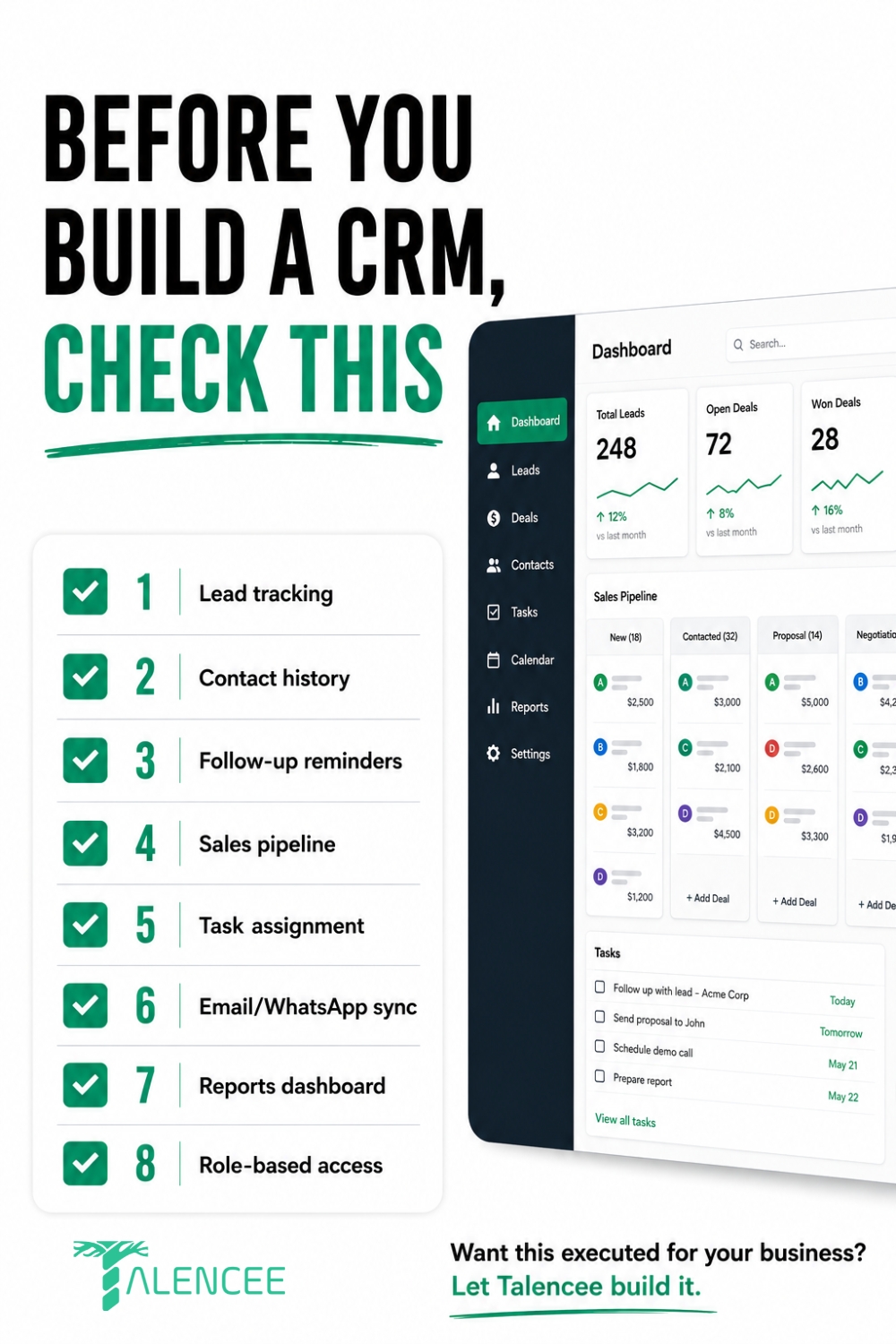
A CRM that actually gets used needs eight core features: lead tracking, contact history, follow-up reminders, a visible sales pipeline, task assignment, email and WhatsApp sync, a reports dashboard and role-based access. These are the CRM development features to check before you build or buy anything. Missing any one of them usually means someone on the team falls back to spreadsheets or memory within a few months, which defeats the purpose of having a CRM at all.
The bigger risk is not picking a CRM with too few features. It is ending up with one that nobody uses. Depending on the study, somewhere between 20% and 70% of CRM projects fail to meet their goals, and poor user adoption, not the software itself, is consistently named as the biggest cause. This guide explains each of the eight CRM development features, what to look for in each one, how to roll a CRM out so people actually use it, and when a custom build beats an off-the-shelf tool.
Quick note: We are Talencee, and we build custom CRMs, so we have a stake in this topic. We have written this guide to help you judge any CRM, whether you buy it or build it. The section on messaging and data rules is general information, not legal advice.
Why CRM Feature Choice Matters More Than Most Businesses Expect
Many small businesses still run without a CRM. Sources such as SLT Creative report that about half of very small businesses, those with fewer than ten employees, do not use one, often because of budget or complexity worries.
For the businesses that do adopt a CRM, the return can be real, but it depends on use. A widely quoted figure from Nucleus Research puts the return at about $8.71 for every dollar spent. Later roundups, such as this one from Wave Connect, say returns have settled closer to $3 per dollar as the market matured. Treat all of these as rough guides. The point they agree on is that the return only appears when the team uses the CRM and the data stays clean.
Choosing CRM development features is a business decision, not just a technical one. The list matters less than how well each feature fits your sales process and how easy it is to use. A smaller set of features that people actually open every day beats a long list that nobody trusts.
The 8 Features That Actually Matter
These eight CRM development features work as a set. Each one solves a specific problem that businesses without a CRM run into every week.
1. Lead Tracking
Every inquiry, whether it comes from a website form, a phone call, a social media message or a walk-in, needs to land in one place automatically. Without this, leads live in someone's inbox or notebook, and the ones that do not get followed up simply disappear.
What to look for:
• Automatic capture from your website forms and ad lead forms
• A simple way to add leads manually, including by phone
• A field showing where each lead came from
• Duplicate detection, so the same person is not entered twice
2. Contact History
A running record of every interaction with a customer, not just their basic details. This is what lets any team member pick up a conversation without asking the customer to repeat themselves.
What to look for:
• A single timeline of calls, messages, emails, meetings and notes
• Easy search by name, phone number or company
• Notes that anyone on the team can read and add to
• A record of who spoke to the customer and when
3. Follow-Up Reminders
Automatic nudges when a lead has not been contacted in a set number of days. This single feature often recovers a meaningful share of leads that would otherwise quietly go cold.
What to look for:
• Reminders you can set manually for a specific date and time
• Automatic reminders when a lead has had no activity for a set period
• Alerts that reach people where they work, such as email, app notification or WhatsApp
• A clear list of overdue follow-ups for managers
4. Sales Pipeline
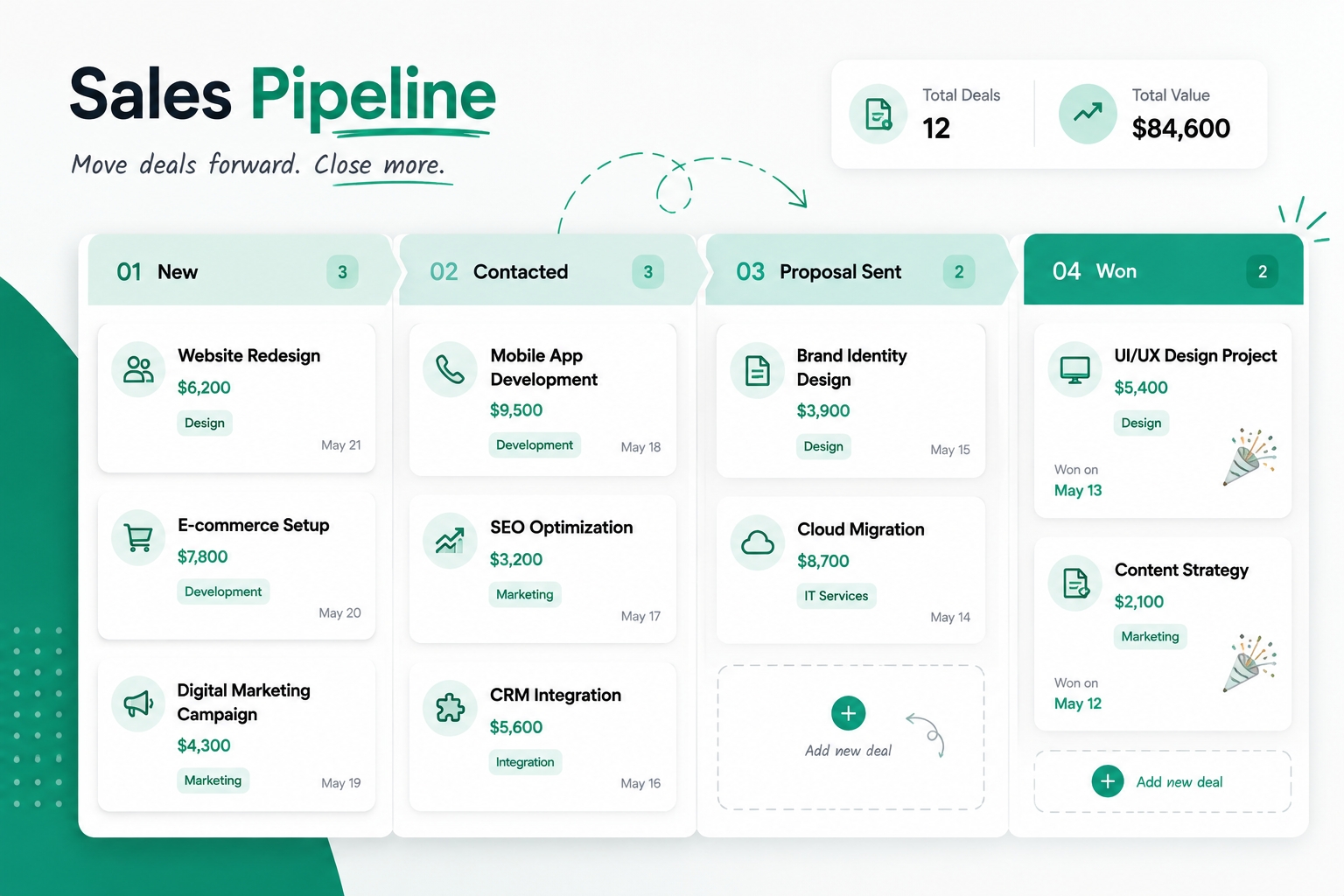
A visual view of where every deal actually stands, not a mental estimate. This is usually the feature that turns a CRM from a database into something a sales team opens every day.
What to look for:
• Stages that match your real process, such as New, Contacted, Proposal Sent and Won
• Drag-and-drop movement of deals between stages
• The value and expected close date on each deal
• A simple way to record why a deal was lost
5. Task Assignment
Clear ownership for every next step. Without this, follow-ups get assumed to be someone else's responsibility, which is one of the quieter ways leads fall through the cracks.
What to look for:
• Every lead and deal has one named owner
• Tasks with due dates linked to the lead or deal
• Easy reassignment when someone is absent or leaves
• A manager's view of each person's open tasks
6. Email and WhatsApp Sync
For many small businesses, especially in India, WhatsApp is where real customer conversations happen, not email. A CRM that only syncs email misses a large share of genuine customer interactions.
What to look for:
• Email conversations linked automatically to the right contact
• WhatsApp messages logged on the contact's timeline
• Message templates for common replies
• Clear records of customer consent, as explained in the messaging section below

7. Reports Dashboard
A simple view of what is working: which lead sources convert, which team members follow up on time, and how many deals are at each stage. All of this should be visible without exporting data into a spreadsheet.
What to look for:
• Leads and deals by source, owner and stage
• Conversion rates from one stage to the next
• Overdue tasks and response times
• Filters by date range and team member
If your reporting needs grow, our BI dashboards and reporting service can build deeper dashboards on top of CRM data.
8. Role-Based Access
Not everyone needs to see everything. Giving each team member access to only what is relevant to their role keeps the system simpler to use and protects sensitive customer data.
What to look for:
• Roles such as admin, manager and sales rep, with different permissions
• Control over who can export data, delete records or change settings
• An activity log showing who changed what
• Mobile access that follows the same permission rules, so people can update records on the go
A single example makes this concrete. A service business that adds only two of these CRM development features, follow-up reminders and a visible pipeline, often recovers leads that were previously lost to a simply forgotten callback. In many cases, that one change delivers the biggest early gain, which is why the order in which features are rolled out matters almost as much as which features are chosen.
The 8 CRM Development Features at a Glance
Feature | Problem it solves | Question to ask |
Lead tracking | Enquiries scattered across inboxes and notebooks | Does every lead source land in one place automatically? |
Contact history | Customers repeating themselves | Can anyone see the full history in one timeline? |
Follow-up reminders | Leads going cold | Do reminders trigger on their own? |
Sales pipeline | Guessing where deals stand | Do the stages match our real process? |
Task assignment | Follow-ups nobody owns | Does every next step have one named owner? |
Email and WhatsApp sync | Conversations that never reach the CRM | Are WhatsApp chats logged, with consent recorded? |
Reports dashboard | Reporting by spreadsheet | Can we see conversion by source without exporting? |
Role-based access | Too much visibility and data risk | Can we control who sees and exports what? |
Features Worth Adding Later
Once the eight basics are used daily, you can add more. Do not start with these extra CRM development features, because every addition adds cost and complexity.
Feature | Add it when |
Workflow automation | Your team repeats the same manual steps every day |
Quotes and invoices | You send many quotes and want them tracked in one place |
Integrations with accounting or support tools | Data is being copied between systems by hand |
Customer portal | Clients need to see their own status or documents |
AI assistance, such as note summaries or lead scoring | You have clean data and consistent use already |
Multi-language support | Your team or customers work in several languages |
Messaging, Data and Privacy Rules in India
A CRM stores personal data and often sends messages, and several of the CRM development features above, such as WhatsApp sync, touch these rules. This section is general information. Please take legal advice for your situation.
Personal data
India's Digital Personal Data Protection Act, 2023 may apply to the customer data you collect. The government notified the DPDP Rules in November 2025, with a phased rollout. You can read the official summary in this Press Information Bureau document. In practice, collect only the data you need, record why you collected it, protect it with access controls and delete it when you no longer need it.
WhatsApp is the most useful channel for many Indian businesses, but connecting it to a CRM works differently from using the app on a phone. The CRM connects through Meta's WhatsApp Business Platform, which has its own business messaging policy. In short:
• You need the customer's opt-in before sending proactive messages.
• Messages you start must use approved message templates.
• Replies to a customer who messages you first can usually be free-form within a limited window, commonly 24 hours.
• Template messages are usually charged per message, and prices change, so check Meta's current rates.
Your CRM should record each customer's consent, including when and how they gave it, and it should make opting out simple.
Calls and SMS
India's telecom regulator, TRAI, controls commercial calls and text messages through the Telecom Commercial Communications Customer Preference Regulations, 2018. These include registration, approved message templates and respect for the Do Not Disturb registry. TRAI explains the background in its press note on the regulations. If your CRM will send SMS or trigger calls, ask how it handles these rules.
Common Reasons CRM Adoption Fails, Even With the Right Features
CRM development features do not decide whether a CRM succeeds. Habits do. These are the most common reasons a well-featured CRM still ends up abandoned.
• Poor onboarding. The team is handed a login and left to figure it out, so old habits such as spreadsheets quietly return within weeks.
• Manual data entry burden. Reps spend meaningful time typing information in instead of selling, so entries get skipped or delayed.
• No management enforcement. If leadership does not consistently use the CRM or check it, the team quickly learns that it is optional.
• A mismatched tool. The CRM was built for a different industry or company size, and your process is forced to fit it.
• Messy data. Duplicates, missing fields and out-of-date records make the CRM untrustworthy, so people stop looking at it.
• Too many fields. Long forms slow people down, so they enter the minimum or nothing at all.
What a Good CRM Rollout Actually Looks Like
Choosing the right CRM development features does not matter much if the rollout is rushed. A phased approach prevents most of the adoption problems above, and it is usually skipped in favour of switching everyone over at once.
• Weeks 1 and 2: data migration and basic setup. Import existing contacts and set up pipeline stages that match your actual sales process, not a generic template that came with the software.
• Weeks 3 and 4: team training and required use. Every new lead goes into the CRM, no exceptions, even while old habits still feel faster. This is the phase most rollouts skip, and it decides whether adoption actually sticks.
• Month 2 onward: refine based on real usage. Drop fields nobody fills in, automate steps that reps still do manually, and check the reports dashboard monthly to catch drop-off early, before it becomes a habit.
Skipping straight to "everyone should just start using it" without this structure is a large part of why a well-featured CRM still ends up abandoned within a few months.
Two simple habits help throughout:
1. Name one CRM owner. One person is responsible for data quality, user questions and changes.
2. Hold meetings from the CRM. Run weekly sales reviews from the pipeline view, not from separate spreadsheets. When the CRM is the only source of truth, people keep it up to date.
Should You Build a Custom CRM or Use an Off-the-Shelf One?
Off-the-shelf CRMs cover these CRM development features well for most small businesses, and they cost far less to get started. A custom-built CRM makes sense once your process has specific steps, integrations or approval flows that no off-the-shelf tool handles cleanly. At that point, forcing a generic tool to fit usually costs more in ongoing workarounds than building the right one would have.
Factor | Off-the-shelf | Custom built |
Cost to start | Low | Higher upfront investment |
Time to launch | Days | Several weeks to a few months |
Best for | Standard sales processes | Unique workflows or integrations |
Ongoing cost | Subscription, scales with users | Build cost plus hosting and support, and no per-seat licence fees |
Flexibility | Limited to the platform's features | Fully matches your exact process |
Ownership | You rent access | You can own the code, if the contract says so |
A reasonable rule of thumb: start with an off-the-shelf tool covering these eight features, and only consider a custom build once you can clearly name the specific workflow it cannot handle.
Signs you may need a custom CRM:
• You have an approval flow, such as discounts that need manager sign-off, that off-the-shelf tools cannot model.
• You need to connect the CRM to your own software, such as a booking system, a project tool or an internal portal.
• Your pricing, quoting or service rules are too complex for standard fields.
• You pay for many licences but only use a small part of the features.
• You want the CRM to be part of a product you sell to customers.
If you are in that position, see our CRM development service. For wider projects, our custom software development service covers the full process, and our guide to choosing a custom software development company in India explains how to judge vendors and who should own the code.
How to Measure CRM Success
Do not judge a CRM by how many CRM development features it has. Judge it by the results it produces. Useful measures include:
• Active users. What share of the team logs in and updates records each week?
• Data completeness. Do leads have a source, an owner and a next step?
• Response time. How quickly are new leads contacted?
• Follow-up rate. What share of tasks are completed on time?
• Stage-to-stage conversion. Where are deals getting stuck?
• Pipeline accuracy. Does the forecast match what actually closes?
Agree on two or three of these before launch, and review them monthly.
Putting This Together
None of these eight CRM development features matter much in isolation. Lead tracking without follow-up reminders just becomes a longer list of names nobody calls back. A sales pipeline without task assignment shows you where deals are stuck without telling anyone whose job it is to move them. The features work as a set, and the rollout order, data first, required use second and refinement third, determines whether that set actually gets used or quietly abandoned like the many CRM projects that fail to meet their goals.
Frequently Asked Questions
What is the minimum CRM a small business actually needs?
At minimum, three CRM development features: lead tracking, contact history and follow-up reminders. These three alone prevent the most common failure: leads going cold because no one remembered to follow up.
Do I need a custom CRM or can I use an off-the-shelf tool?
Most small businesses are better served by starting with an off-the-shelf tool. Consider a custom build only once you can point to a specific workflow or integration that the off-the-shelf option genuinely cannot support.
How long does CRM implementation typically take?
A basic off-the-shelf setup can be running within days. A custom-built CRM with specific integrations typically takes several weeks to a few months, depending on complexity.
What is the biggest reason CRM projects fail?
Poor user adoption, not the software itself. A CRM with every feature on this list still fails if the team does not use it consistently, which usually comes down to onboarding and management follow-through.
Can a CRM integrate with WhatsApp in India?
Yes, and for many small businesses this integration matters more than email sync. It works through the WhatsApp Business Platform, which requires customer opt-in and approved message templates for messages you start.
How do I get my team to actually use the CRM?
Make it required, not optional, from day one: every new lead goes into the CRM, no exceptions. Combine this with a rollout phased over the first 60 days, and check usage in the reports dashboard monthly to catch anyone falling back to old habits early.
How much does a custom CRM cost?
It depends on the number of features, integrations, users and the level of security needed. Ask for a written scope with a breakdown, and compare it with the multi-year subscription cost of an off-the-shelf tool.
Which CRM development features should I build first?
Start with lead tracking, contact history, follow-up reminders and a pipeline. These deliver the quickest gains. Add task assignment, messaging sync, reports and role-based access as soon as the team is using the basics.
Conclusion
The right CRM development features are the ones your team will use every day: lead tracking, contact history, follow-up reminders, a visible pipeline, task assignment, email and WhatsApp sync, a reports dashboard and role-based access. Get those eight working, roll them out in phases, name an owner and measure usage, and a CRM can earn its cost many times over. Skip the habits, and even the best features end up unused.
Off-the-shelf tools cover most businesses well, but once your process outgrows them, building something that actually fits is worth doing properly. If that is where you are, see how our custom CRM development work looks in practice, explore our custom software development service, or contact us to talk through your process.
Sources and Further Reading
• SLT Creative, CRM Statistics 2026. Failure-rate range of 20% to 70%, and small business adoption.
• Wave Connect, CRM Statistics 2026. Failure and ROI figures, including the view that returns are settling closer to $3 per dollar.
• Agiled, CRM statistics. Small business adoption and the share of failures attributed to poor adoption and bad data.
• Nucleus Research. The often-quoted figure of about $8.71 returned per dollar spent, which is older and should be treated as a rough guide.
• Press Information Bureau, DPDP Rules, 2025 summary.
• TRAI, press note on the Telecom Commercial Communications Customer Preference Regulations.
• WhatsApp, Business Messaging Policy. Opt-in, templates and acceptable use.